About OnePay Wireless
Share
In this article
Share
In this article
What is OnePay Wireless?#
OnePay Wireless is a prepaid mobile service available to eligible OnePay customers. For $35 per month (plus taxes and fees, 30 day plan), your plan includes unlimited talk, unlimited text, and unlimited 5G data on AT&T’s nationwide network. There are no long term contracts or hidden fees—you pay each month before using the service.
How can I Sign Up?#
Open the OnePay app and select OnePay Wireless from the Discover More section of your Home Tab. You’ll be guided through the process of choosing whether to keep your current number or pick a new one, and completing payment. Activation instructions for eSIM will appear in the app once payment is confirmed.
You must have an eSIM-eligible device to use OnePay Wireless.
What is an eSIM?#
An eSIM is an embedded SIM card that is built into your phone. It lets you activate mobile service without needing a physical SIM card. If your device is compatible, you can set up your Wireless plan directly through the OnePay app.
What is a prepaid phone plan?#
A prepaid phone plan means you pay for service before you use it. With OnePay Wireless, you pay $35 plus taxes and fees up front and receive unlimited data, talk, and text for 30 days.
What plans are available?#
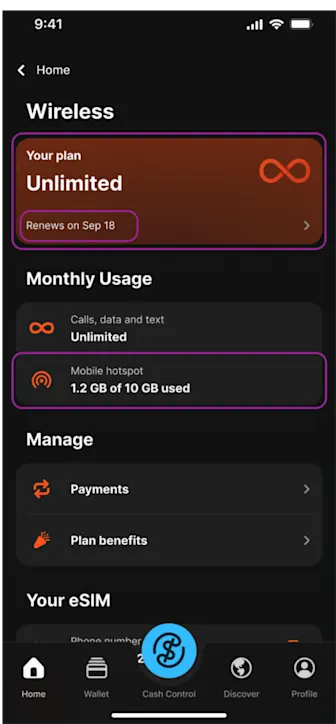
OnePay Wireless offers a single plan for $35 per month (a month equals 30 days) plus taxes and fees. It provides unlimited talk, unlimited text, unlimited 5G data, and 10GB of mobile hotspot on AT&T’s network. If you decide to stop service, cancel in the app before your next payment date, and you will not be charged again.
What network does OnePay Wireless use? #
OnePay Wireless runs on AT&T’s nationwide LTE and 5G network, so wherever you see AT&T service, you’ll have coverage.
Is OnePay Wireless a wireless carrier?#
No. OnePay Wireless is powered by Gigs, our wireless carrier partner. Review the OnePay Wireless Terms of Service, Gigs’ Terms of Service, and Privacy Policy for more information.
What is an IMEI and why do I need it?#
Your IMEI (International Mobile Equipment Identity) is a unique 15-digit number that identifies your phone. We use it to confirm that your device is unlocked and compatible with AT&T’s network before activating your eSIM.
You can find your IMEI number in your phone’s settings or by dialing *#06#. If you're not sure where to look, check your device manufacturer’s support site for step-by-step instructions.
How do I check if my device supports OnePay Wireless?#
Before ordering, make sure your phone meets these requirements:
Carrier Unlocked Status
Your phone must be carrier unlocked and not tied to any carrier (like Verizon or T-Mobile). If your phone is locked and you try to transfer your number, you may experience service interruptions. To avoid this, check with your current carrier to confirm your IMEI is carrier unlocked before continuing. You can find your IMEI in your device settings or by dialing *#06# on your device. If your device is locked, request an unlock from your carrier before signing up.
AT&T Band Compatibility
Find your phone’s model number under Settings > About (iPhone) or Settings > System > About Phone (Android). Then, verify on the manufacturer’s website that this model supports AT&T LTE or 5G bands. Most devices released in the last few years meet these requirements.
eSIM Capability
Open your phone’s Settings and look for an option labeled “Add eSIM,” “Add Cellular Plan,” or similar. If you see it, your phone can use an eSIM for activation. If you don’t see any eSIM option, your phone cannot use eSIM, and you won’t be able to sign up.
How do I check how much data I have left?#
Your plan, renewal date, and current data usage appear on the main Wireless screen in the app.