


Share
In this Article
Share
In our recent post, Inside OnePay’s AI Journey, we discussed how we are deploying AI across the OnePay ecosystem. We sought to achieve some simple but powerful objectives: improve operational efficiency, increase our velocity, and create delightful experiences for our customers.
Along the journey, it became abundantly clear that the power of generative AI lies in its ability to unlock the value trapped in unstructured data: chat transcripts, voice conversations, documents, logs, etc. We realized that one of our largest, most critical sets of unstructured data was one we looked at every day: our own codebase.
For years, codebases were difficult to access unless you were an engineer intimately familiar with it. If a product manager wanted to know how a specific payment flow handled edge cases, or a designer wanted to understand if a UI component was reusable, they had to tap a human expert on the shoulder. This created bottlenecks and placed immense pressure on our senior engineers to act as walking encyclopedias, often about details they might have written years ago and forgotten.
We asked ourselves: What if we built an AI Agent specialized in our codebase?
Code is Knowledge Locked Away
The promise of agentic coding tools is often sold as "lowering the barrier to coding." While true, the bigger opportunity is lowering the barrier to understanding.
Historically, getting answers from our codebase required a complex set of rituals: setting up a developer workstation, understanding git workflows, and managing the complex maze of dependencies needed to run the stack locally. More importantly, it requires a user to know how to read code and understand it. This effectively firewalled our codebase from non-engineers and slowed down engineers working outside their primary areas of focus.
We needed an interface that could:
Democratize Access: Run in a browser or Slack with no local configuration.
Understand Context: Navigate seamlessly across our backend and frontend codebases, understanding where each concern lives.
Visualize Answers: Provide a real-time simulator of our mobile app to prove its findings.
Execute Safely: Run code in a fully sandboxed environment.
We didn't just want a coding bot; we wanted a system that could answer "What happens if...?" by actually trying it. Our attempt to unlock this data resulted in our latest agent: Tokki
Meet Tokki (토끼)
Tokki is Korean for Rabbit, and ties into our cultural values of hunger and execution speed. The aspiration is to give anyone at OnePay the ability to ask questions about our code, describe new changes or features, with Tokki sprinting through the implementation while they focus on design and review.
Architecture Overview
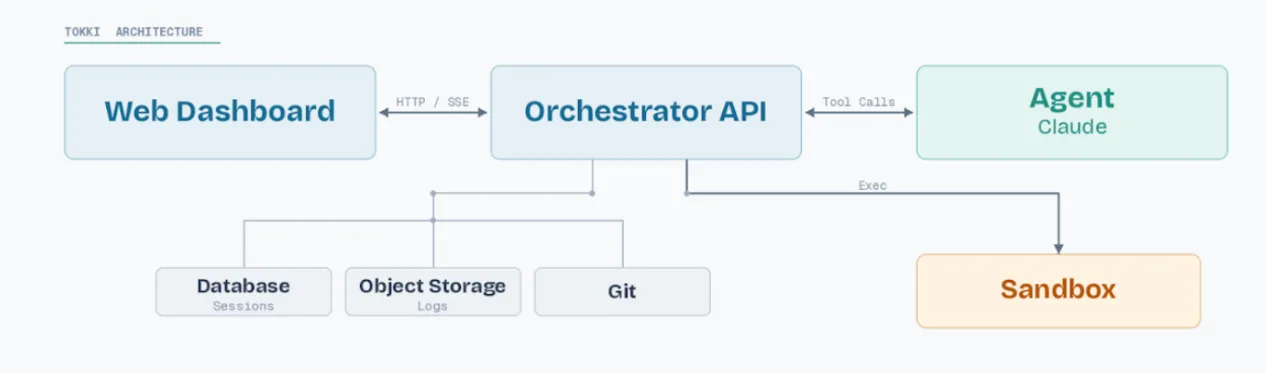
Tokki has four main components:
Dashboard: A web interface where users interact with the agent, ask questions, and propose changes to the codebase. They see a real-time view of progress the agent is making, and preview any changes to the app experience in the simulator.
Orchestrator: An API backend that manages task lifecycle, authentication, streaming, and coordination.
Agent: The LLM-powered loop that receives a prompt, plans work, calls tools, and iterates until done.
Sandbox: Isolated environments for each user session. All code execution and tool calls happen inside these sandboxes for maximum security.
Dashboard
The dashboard is where users interact with Tokki. It looks familiar to anyone who’s used ChatGPT or Claude – there’s a history of past conversations and a chat box to start a new one. We extended this to include additional contextual OnePay-specific functionality: SSO integration with our corporate systems, Gitlab for pushing MRs, and a dedicated app preview pane.
Engineering the Sandbox
Giving an LLM the ability to run arbitrary shell commands is a trust exercise. We need isolation, not just for security, but for reliability.
To solve this, we used the Agent Sandbox kubernetes project, a set of tools designed specifically for AI agent sandboxing. The orchestrator retains control of the agent loop, making LLM API calls, managing conversation state, and deciding which tools to call. The sandbox pod is a stateless executor: it receives a tool call over HTTP, runs it in isolation, and returns the result.
When developing and testing, we quickly realized that bootstrapping the environment on each sandbox simply took too long. To solve this, we pre-baked container images with dependencies for all of our repos. A warmed sandbox is ready to execute tools as soon as it is claimed. This dropped startup latency from up to 60 seconds to under a second.
A repo-cache DaemonSet periodically syncs repositories to local storage and pre-bakes node dependencies. The init container also sets up git configuration, fetches the target branch, and creates the agent's working branch. Background reconciliation services reap idle sandbox pods.
Between the warm pool, the repo cache, the pre-baked dependencies, and the reconciliation services, the sandbox system has a lot of moving parts. But the result is an isolated pod with a fresh copy of their repository ready to use 200 milliseconds after a prompt is sent.
The agent has the standard set of agent tools (file operations, shell execution, todos, and subagents), and we’ve also implemented specialized tools for our environment for interacting with Gitlab and internal MCP servers. One of the most illuminating outcomes of this project is the advantage of creating dedicated tools for agent use.
Visualizing the Code
When working with the OnePay App, seeing the result of a code change is more useful than reading a diff. The preview system gives Tokki users (and Tokki) a live view of the app running in the browser.
When a task targets our app, the orchestrator starts three services:
Webpack dev server: Serves the app with hot module replacement.
WireMock: Provides mocked API responses so the app has data to render.
Preview proxy: Sits between the browser and webpack, injecting an error capture script into the HTML.
The dashboard embeds the preview alongside the chat interface. As the agent modifies code, webpack picks up the changes and updates the preview.
We introduced an error relay to solve the problem of app crashes halting the agent loop. Runtime errors like component crashes and exceptions are automatically related to the agent as a followup message. Tokki sees the error, reads the relevant code, and fixes it. This creates a tight feedback loop that mimics human developers glancing at the browser after making a change, and helps keep the process moving.
In Tokki, all app data is mocked with Wiremock. We use Wiremock extensively for UI automation already, so we built the interface around these existing mocks. Users can quickly switch between different combinations of products to see how the app behaves under different user states. The agent sees these preset switches too, so you can say "switch to the logged-out preset and make sure the login screen looks right.
Tokki Across Surfaces
We knew from the beginning that Tokki shouldn’t be tethered to the web, so we built an API for service-to-service communication, and created a Slack integration as another consumer. This lets us chat with Tokki directly from Slack, and use Tokki in larger orchestration flows.
The API follows a simple pattern: create a task, poll for status (or receive a webhook callback), optionally approve or reject actions that require human oversight. By default, certain actions (like creating a pull request) pause and wait for human approval before proceeding. The callback delivers the pending action to Slack, where a user can review, approve or reject with a button click.
Takeaways
A few takeaways after building and operating this for a while:
Tokki is changing how decisions are made. Product teams can validate hypotheses by asking Tokki to mock up a feature without waiting for a sprint planning meeting. Engineering uses it as a forcing function for codifying our architecture patterns: if the agent struggles, it’s a signal that our documentation or conventions are unclear.
The sandbox is the hardest part. The agent loop, tool implementations, and dashboard are all straightforward engineering. Getting reliable, fast, isolated execution environments with warm pools, resource management, and cleanup is where the real complexity lives.
Feedback Loops are powerful. Feeding runtime errors back to the agent seems like a small feature, but it's the difference between the agent producing code that compiles and code that actually works. The tight loop of change-preview-error-fix is where most of the quality comes from in UI work.
The Environment matters. The ability to fine-tune a custom environment, with appropriate tools, dependencies, and mocking already setup is a huge unlock. It’s a time saver for engineers, and helps unlock the promise of AI development for other teams.
Building Tokki has validated our core hypothesis: true power of a developer agent lies in unlocking the knowledge contained within our codebase. By prioritizing reliability, speed, and a deep integration with our existing systems, we’ve transformed our codebase into a fully accessible, conversational resource for the entire organization. Tokki is being rapidly adopted internally, and we’re excited to see it grow and evolve.